

One of the goals for the FOSSnix IT platform is simple:
Make self-hosted services securely accessible without exposing the home or office network to the internet.
After evaluating the options, I decided to deploy Cloudflare Tunnels for publishing selected services such as Nextcloud, BookStack, and other web applications.
For my use case, it strikes a practical balance between security, simplicity, and operational flexibility.
The Traditional Approach
Historically, publishing an internal application meant opening inbound ports on the firewall.
For example:
- Port 80 for HTTP
- Port 443 for HTTPS
- Additional ports for other applications
Those services would then be directly reachable from anywhere on the internet.
Even when protected by TLS and authentication, every exposed service becomes another attack surface that requires monitoring and maintenance.
For a small business or home office, minimizing that exposure is a worthwhile objective.
How Cloudflare Tunnels Work
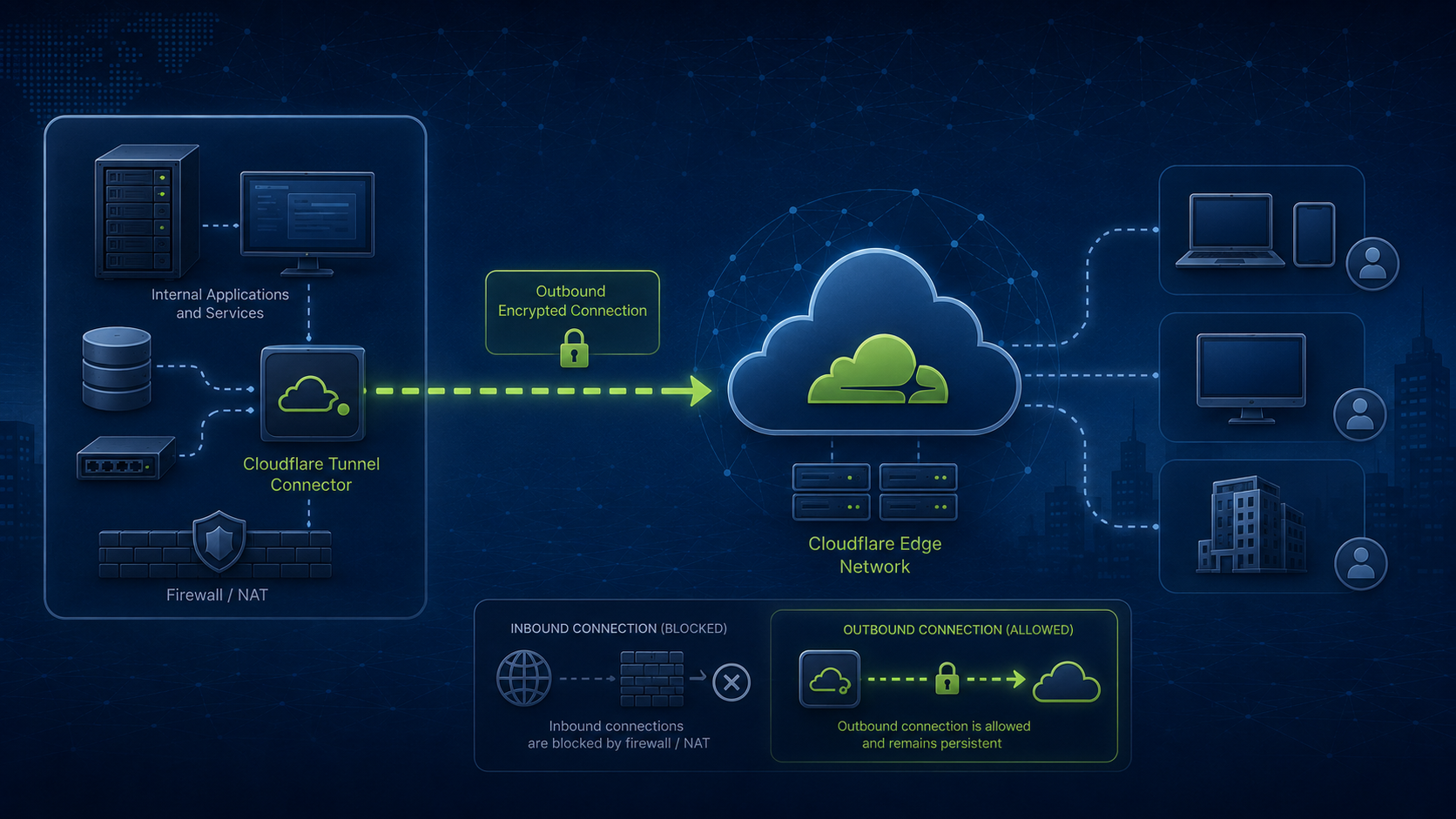
Instead of accepting inbound connections, the Cloudflare Tunnel connector establishes an outbound connection from inside the network to Cloudflare’s edge.
Users connect to Cloudflare.
Cloudflare securely forwards traffic through the existing outbound tunnel to the internal application.
The result is that:
- No inbound firewall ports need to be opened.
- The public IP address remains hidden.
- Services can be published individually.
- TLS certificates are handled automatically.
- DNS management is centralized.
The internal server never needs to be directly exposed to the public internet.
A Better Fit for Self-Hosted Infrastructure
At FOSSnix IT, many services are intentionally self-hosted.
Examples include:
- Nextcloud
- BookStack
- FreeScout
- Uptime Kuma
- Internal documentation
- Administrative dashboards
Cloudflare Tunnels allow these applications to remain on infrastructure that I control while still being conveniently accessible from anywhere.
It supports the broader philosophy of ownership without sacrificing usability.
Layering Security
Cloudflare Tunnels work best when combined with additional protections such as:
- Multi-factor authentication
- Strong passwords
- Network segmentation
- Regular updates
- Monitoring and alerting
- Backup and recovery planning
Security is strongest when multiple layers work together rather than relying on a single control.
It’s Not a Replacement for VPNs
One misconception is that Cloudflare Tunnels eliminate the need for VPNs.
In reality, they solve different problems:
- A tunnel is excellent for publishing specific web applications
- A VPN provides authenticated access to an entire private network
For administrative access, management interfaces, and infrastructure services, a VPN often remains the more appropriate choice.
At FOSSnix IT, both approaches have a place.
Less Time Managing Firewall Rules
One unexpected benefit of moving to Cloudflare Tunnels is operational simplicity:
- There are fewer port forwards to document
- Fewer inbound rules to audit
- Fewer services directly exposed to automated internet scanning
That reduces complexity while making the overall environment easier to understand and maintain.
The FOSSnix IT Perspective
Technology decisions should reduce operational risk while improving usability.
Cloudflare Tunnels are not the right solution for every workload, but they provide an elegant way to publish web applications without unnecessarily exposing internal infrastructure.
For small organizations that value ownership, security, and simplicity, they can be an effective part of a modern infrastructure strategy.
Sometimes the best firewall rule is the one you never have to create.